Clemaine
Booking software for salons and spas, coming soon: a booking site for each salon, and one app for the front desk's calendar, deposits and walk-ins.
- Year
- 2026
- Status
- In development. Coming soon at clemaine.com
The problem
A salon's day runs on its book. Clients expect to book online at any hour, and a client who does not turn up leaves a chair empty for the length of the appointment.
The book says which stylist sees which client, for which service and for how long, and it changes all day. Bookings arrive online overnight, clients walk in and phone the desk, and a client who cancels an hour before leaves a gap that is hard to fill.
Many salons run their book on an app such as Fresha or Booksy. Clemaine is booking software of that kind, for salons and spas. A salon that moves to a new app has to bring its client list and its booked appointments across.
What we built
We are designing and building Clemaine: a booking site for each salon, in the salon's own name, and an app for the front desk that runs the calendar, deposits and fees for missed appointments, walk-ins and checkout.
Everything below is built. Clemaine is not open yet, and no salon uses it.
Booking online
Each salon gets its own booking site, with the name, logo, colours and corner style the owner sets in the admin. A client picks a service, a stylist or “Any professional”, a day and a free time, and books with a name and an email address or phone number. A visit can hold several services back to back, with extras added on, and a client can also book a repeat visit or a place in a class.
If a service takes a deposit, the site says so before the form, along with the cancellation terms. The deposit is paid by card on the confirmation page, with the bank’s extra check (3-D Secure) when the card asks for it.
Clients sign in with a link sent to their email address, with no password. Signed in, they can move or cancel a booking (with any fee shown first), save a card, buy a gift card, message the salon and leave a review.
The front desk
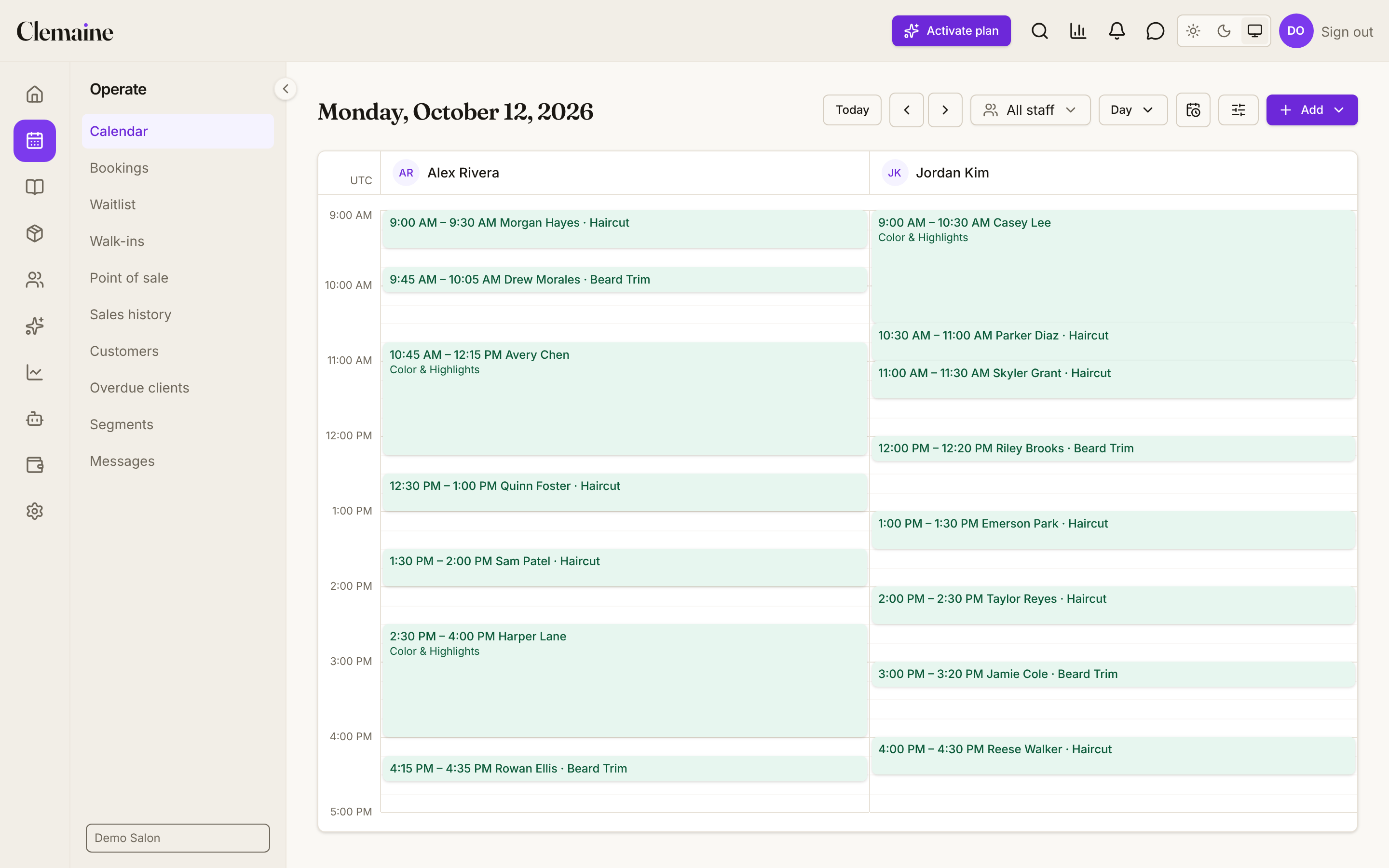
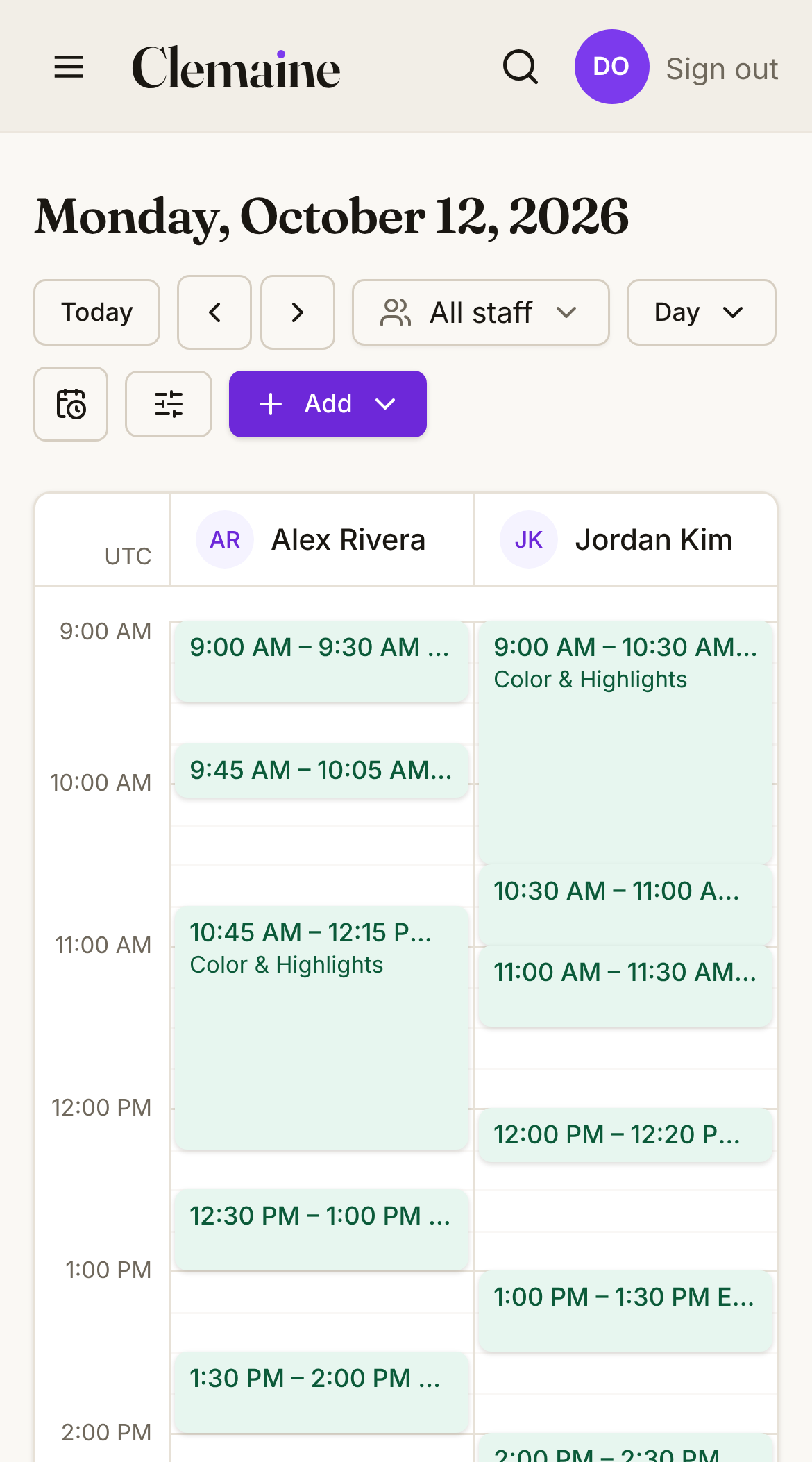
The calendar shows the day, the week or the month, and the day view has a column for each member of staff. Clicking an empty time opens a booking: the desk finds or adds a client, picks the service and chooses a free time. Dragging an appointment to a new time asks the desk to confirm, then lets the person booked know. The desk marks each visit as arrived, completed or a no-show, and records a tip when it completes one.
Free times follow each service’s length and the gap after it, how far ahead clients may book, each person’s working hours and time off, the rooms or equipment a service needs, and the days the salon is closed, all in the salon’s own time zone. Reminder emails go out at the times before a visit that each salon sets.
The screenshots at the top of this page show this calendar in a development build, filled with made-up clients.
Deposits and missed appointments
Each service can carry a deposit and a fee for a late cancellation or a no-show, and the amounts are fixed on each appointment when it is booked. When the desk marks a no-show, or a client cancels inside the salon’s cancellation window, the fee can be charged to a card saved for that client. Each of these charges has its own switch, so a salon can collect by hand instead. When the salon cancels, it charges no fee and refunds a card deposit in full.
Card payments go through Stripe. The owner connects the salon to Stripe from Settings, which asks for a fresh two-factor code, and the desk can charge a client’s saved card from the booking.
Walk-ins and the waitlist
A client who walks in can join the queue on the salon’s booking site with just a name, and a page shows them their place in line. The desk sees the queue in order of how long each person has waited.
The desk can put a client who wants a time that is taken on the waitlist. When a time opens, Clemaine emails them an offer they can claim from a link.
Checkout and the business
Completing a visit takes payment for it, with a tip, and tips can be pooled and shared among the team. The register also sells retail products, prints a receipt and can void a sale. Gift cards, prepaid packages, memberships and loyalty points can all be used at the desk.
Each client has a record with their visits, notes, tags and photos, and each service can ask its own intake questions. The salon can save groups of clients by a rule, such as everyone who has not visited in 60 days, and email them a campaign. Clemaine also handles promo codes and referrals, can ask for a review after a visit, and can hide clients’ phone numbers and email addresses from staff.
Logins come in four levels, from Owner to Staff, and a stylist with a Staff login sees their own day, schedule and earnings. Clemaine also keeps the salon’s stock, suppliers and purchase orders, its expenses and a profit and loss report, and works out payroll with commission and tips as a spreadsheet file. Reports cover staff time and earnings, service revenue, how often clients come back and why bookings are cancelled.
Moving from another app
A salon leaving Booksy or Fresha can upload that app’s export files, and Clemaine brings across the clients, the appointments and the gift cards. It runs a trial first, lists the columns it matched, skipped or did not recognize, and saves nothing until the owner confirms. The service menu, the team, the products and the memberships are set up by hand, and the import screen says so.
Result
Clemaine is in development and coming soon.
It is not open to salons yet. Online booking, the front-desk calendar, the walk-in queue and checkout are built, with automated tests that run each of them in a browser from start to finish. The waitlist is open at clemaine.com.
What it does not do yet
Some parts a salon may expect are not there yet:
- Reminders by text message. Sending texts is built and switched off, so reminders go by email only.
- A link in booking emails for changing a booking. A client with an account changes it there, and a guest calls the salon.
- A screen for putting a salon’s booking site on the salon’s own domain. The check that a salon owns its domain is built, without a screen.
- Card payments through a reader at the desk. Clemaine keeps a list of a salon’s card readers and takes no payments through them.
Technical notes
How it is built
The server is one application written in C# on .NET 10, divided by job (bookings, payments, clients, stock, payroll), with a PostgreSQL 18 database. The admin and each salon’s booking site are web apps in TypeScript, React 19 and React Router 8. Their pages are put together on the server, so each arrives ready to read, and the two apps share one set of buttons, forms and colours.
Prices are stored as whole numbers of the currency’s smallest unit, such as cents, so no rounding creeps in. Deposits, visits, sales, tips, gift cards, refunds and expenses are posted to a double-entry ledger, the bookkeeping method accountants use, and a health check raises an alarm if the ledger and the payments disagree. Times are stored on one standard clock (UTC) and shown in the salon’s own time zone, through the changes for daylight saving time.
Clemaine is built to run on one server as a set of Docker containers: the database, Redis (a cache), the server, the admin, and Caddy, a web server that handles the secure connections and is the only part open to the internet. Each salon’s booking site runs in its own containers beside them, so adding a salon does not restart the server, the admin or another salon’s booking site. Monitoring (Prometheus, Loki and Grafana) runs on the same server, so the logs stay on the machine, and alerts can go out by email.
Every change runs through automatic checks on GitHub Actions (CI). The server’s tests run against a real PostgreSQL database, and a Playwright suite starts the whole system and drives a browser through a client booking online, the desk booking, moving and completing an appointment, a walk-in joining the queue and a retail sale. Other checks look for serious accessibility problems, pages that scroll sideways on a phone, leaked secrets and dependencies with known vulnerabilities.
Security
Each salon’s bookings, clients, sales and stock are kept apart by the database itself. Every table that holds a salon’s data has a row-level security rule, so a query sees only the rows of the salon it runs for, and a salon’s queries run as a database role that cannot get round the rule. When no salon is set, a query returns nothing, and a test fails if a new table holding a salon’s data has no rule.
Staff sign in with a password of at least 15 characters, stored only as an Argon2id hash (scrambled so it cannot be read back), and can add a code from an authenticator app (two-factor), which Clemaine can be set to require of every staff login. Connecting the salon to Stripe and other sensitive changes ask for a fresh code, and staff can sign out of every device at once. Clients sign in through a link that works once, expires after 15 minutes and is stored only as a hash.
The salon’s key to the server stays on the booking site’s own server and never reaches a browser. Card numbers are typed into Stripe’s own fields and go straight to Stripe. Stripe’s payment notices are checked for Stripe’s signature, and each is acted on once, even if it arrives twice or out of order.
In the production setup the database has no port open to the internet, and Caddy and the server both limit how many requests a caller can make. An audit log, which only the Owner and Admins can read, records who booked, moved or cancelled an appointment, changed the salon’s Stripe connection or tax rate, or changed a staff member’s role. A salon can export everything it holds on one client as a file, when a client asks for a copy of their data. A drill restores a backup into a separate database, checks it and removes it.
Next case study
Start a project
Tell us what you need built.
Send a few lines about your business and what you have in mind. We reply within one business day, book a 30‑minute call if it makes sense, and send a fixed quote in writing after that.
Or call 647-252-5352, Monday to Friday, 9 am to 6 pm Toronto time.
